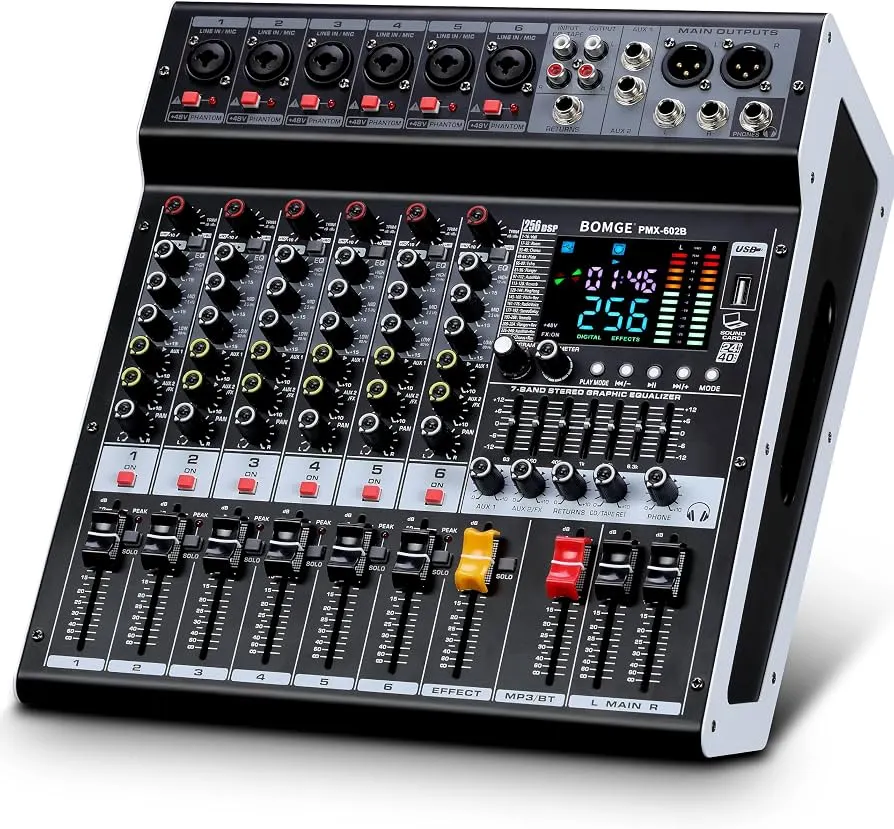
Bomge PMX-602B Powered Mixer 6-Channels
USD 300.00
The BOMGE 602B-6Ch 2x400W is a versatile 6-channel powered mixer amplifier designed for various audio applications. It integrates a mixer and a power amplifier, providing 2x400W output at 4 ohms. Key features include USB and Bluetooth connectivity, 6 high-quality microphone preamps with switchable +48V phantom power, 256 digital signal processing (DSP) effects, and a 7-band main output equalizer.
Product Information
Description
Bomge PMX-602B Powered Mixer 6-Channels 2x400W
The BOMGE 602B-6Ch 2x400W is a versatile 6-channel powered mixer amplifier designed for various audio applications. It integrates a mixer and a power amplifier, providing 2x400W output at 4 ohms. Key features include USB and Bluetooth connectivity, 6 high-quality microphone preamps with switchable +48V phantom power, 256 digital signal processing (DSP) effects, and a 7-band main output equalizer.
Bomge PMX-602B Features :
Connecting Microphones and Line Inputs
The mixer supports both XLR and 1/4'' unbalanced plugs for mono channels.
- For microphones, connect the XLR cable to the MIC/LINE input jack.
- For line-level instruments or devices, use a 1/4'' TS cable for the LINE input.
- If using condenser microphones, activate the +48V phantom power by pressing the corresponding button for the channel. Ensure all connections are made before engaging phantom power.
Connecting Speakers
The mixer features 2x400W power output at 4 ohms.
- Connect your passive speakers to the OUTPUT A and OUTPUT B jacks on the rear panel using appropriate speaker cables.
- Ensure the speakers' impedance matches the mixer's output specifications (4 ohms recommended).
Bluetooth Connectivity
- Press the 'MODE' button on the USB/MP3 player section until 'Bluetooth' mode is selected.
- On your Bluetooth device (smartphone, tablet), search for available devices and select 'pmx-602b' (or similar name).
- Once paired, audio from your device will stream to the mixer. Bluetooth range is approximately 15 feet.
USB/Flash Drive Connection
- Insert a USB flash drive into the USB port on the mixer's front panel.
- The mixer will automatically detect the drive and enter playback mode.
- Use the controls in the USB/MP3 section to play, pause, and navigate tracks.
Channel Controls
Each mono channel (1-6) features the following controls:
- GAIN: Adjusts the input sensitivity for the connected microphone or instrument.
- 3-BAND EQ (HIGH, MID, LOW): Adjusts the treble, midrange, and bass frequencies for the channel.
- AUX: Controls the level of the channel signal sent to the AUX output.
- FX: Controls the level of the channel signal sent to the internal DSP effects processor.
- PAN: Adjusts the stereo position of the channel signal (left to right).
- VOLUME FADER: Controls the overall output level of the channel.
- PAD: Attenuates the input signal for high-level sources.
- MUTE: Silences the channel output.
- SOLO (PFL): Isolates the channel signal for monitoring through headphones without affecting the main mix.
DSP Effects
The mixer includes a 24-bit digital effects processor with 256 preset effects.
- Use the 'PROGRAM' knob to select one of the 256 available effects (e.g., Hall, Room, Chorus, Plate, Delay). The selected effect number will be displayed on the screen.
- Adjust the 'FX LEVEL' control to set the overall intensity of the selected effect.
- The 'FX MUTE' button can temporarily disable the effects.
- An FX foot switch input allows external control to turn effects on or off.
Main Output 7-Band Equalizer
The main output features a 7-band graphic equalizer for fine-tuning the overall audio output.
- Adjust the faders for each frequency band to shape the sound of the main mix.
- This allows for compensation for room acoustics or specific sound preferences.
USB Playback and Recording
The USB interface supports playback of digital audio files and recording of the main mix.
- Playback: Insert a USB flash drive with audio files. Use the 'PLAY/PAUSE', 'PREV', 'NEXT', and 'MODE' buttons to control playback.
- Recording: The mixer can record the main output directly to a connected USB device. Refer to the specific instructions on the unit's display for initiating and stopping recordings.
- The mixer also functions as a USB sound card/audio interface for connection to a computer (MAC compatible).
Monitoring
Connect headphones to the headphone jack for monitoring the main signal or individual channels using the PFL (Pre-Fader Listen) function.
You may also like
Related Products